ForTrace++ Philosophy
Broad Overview of Architecture
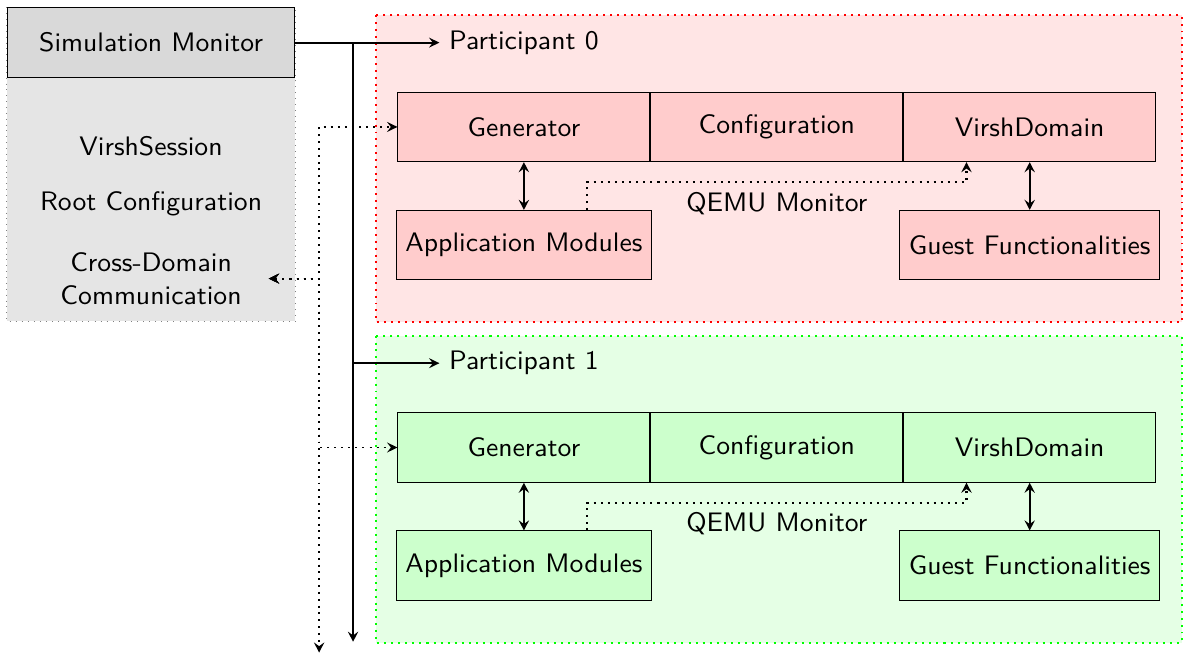
The following figure shows the high level architecture of ForTrace++. It is intended to provide a broad overview and additional information can be found in the actual code documentation.
ForTrace++ architecture
Simulation Monitor
This class drives a (multi-)participant scenario, thus it is tasked with the creation of all participating domains, libvirt’s term for VMs, and their individually associated Generators. The Simulation Monitor holds the connection to the hypervisor, wrapped in the VirshSession object, the root YAML configuration, and the method that enables cross-domain communication. The latter feature is especially useful if an action on one VM should trigger another action on a different one, without tainting the generated data sets with unusual communication. Otherwise, the VMs are strictly separated from each other. Each VM has only one monitored network interface, which is connected to a libvirt network with Internet access, which is far more realistic than before. One or more Participants are tied to and controlled by the Simulation Monitor. The actual VM is wrapped inside the VirshDomain object of a participant. This object provides access to the Guest Functionalities, like power-management of the VM. Application Modules interact with their associated VM through the QEMU Monitor, a piece of software able to send complex commands – including mouse and key inputs – to QEMU. These inputs appear completely transparent to the simulated guest like a normal keyboard or mouse. The actual objects, representing the applications, are created on the host and are only intended to be used as wrappers around the QEMU Monitor. The communication between ForTrace++ and a VM via the QEMU Monitor cannot be captured with a network sniffer, since it happens entirely locally and not via TCP sockets as before. Since there is no additional software running on the guest to provide feedback to ForTrace++, the communication to the VMs is unidirectional, meaning a command is issued to a VM, but there is no response whether it was successful. This is the main drawback of the agent-less approach, which must be mitigated in order to be able to use this approach reliably.
Participant
Participants are only used to group a domain (VM) together with the associated Generator and its (merged) configuration. They are used by the Simulation Monitor to handle a multi-domain scenario, including setup steps, the execution, and post-execution steps.
Simulation Process
Flowchart of the simulation process, using the Generator.
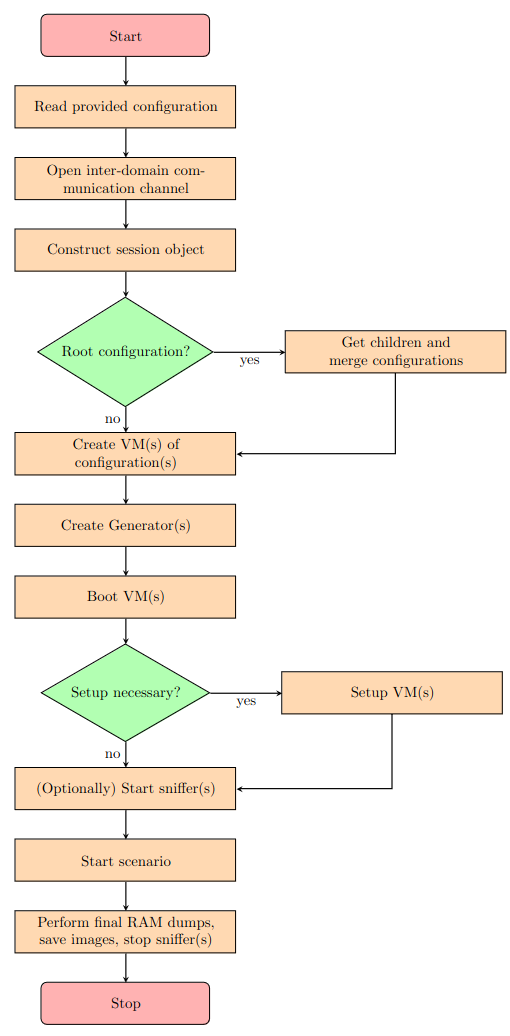
ForTrace++’s simulation process can be described in a very abstract way, as depicted in the figure above. A Simulation Monitor is created with the path to a configuration file. It is read in, and determined, whether it is a root- or domain-configuration. This important to determine, if children need to be created and their configurations merged with the root configuration. Afterwards, the inter-domain communication channel is established that enables domains to exchange information without tainting the dataset, e.g., trigger a RAM dump on one domain, based on the state of another. The session object, constructed in a next step, resembles the connection to the hypervisor and must be used to create new domains, an start the local network. After the creation of the domains, for each one a Generator is constructed, which drives the scenario by filling it with semi-random actions. Then the domains are booted and, if necessary and implemented, setup steps are executed. After the boot and setup is completed, one network sniffer per domain is started, if specified in the configuration. The scenario can be started and each Generator takes over in its own thread. Finally, after all Generators are exhausted and all their threads are joined, final RAM dumps are created and the network sniffers are halted. After the domains are powered down, the specified image dumps are created.
ForTrace++ Generator
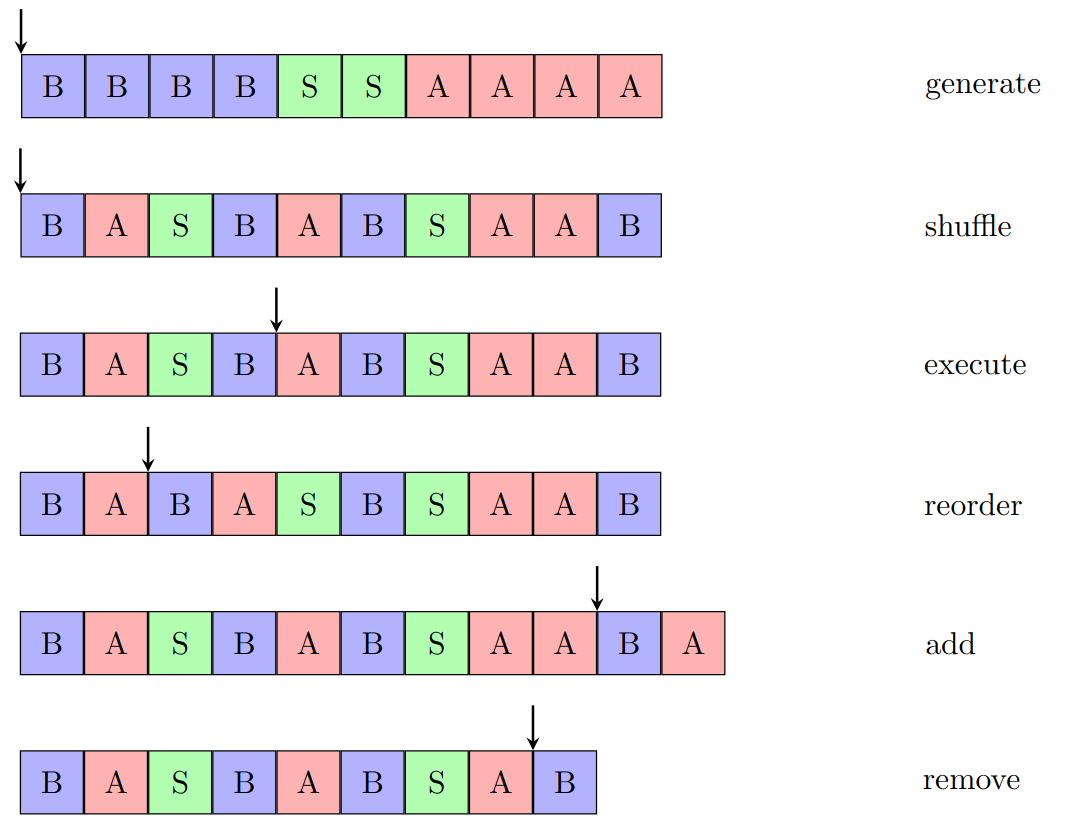
The Generator component is able to drive a whole simulation, filling it with semi-random interactions specified in the YAML configuration of a domain/a scenario. Each participating domain in a scenario has its own Generator, in its own thread. Thus, a scenario might consist of multiple Generators. The following figure shows all actions that are currently supported by the class.
ForTrace++ Generator supported action element operations
generate: This is the first step undertaken by the generator after startup. It reads in the provided configuration and generates all action elements to be executed throughout the scenario.
shuffle: Based on the provided seed, the generator shuffles the action elements of the generated set, so they can be executed in a semi-random order. By providing the same seed to a scenario, it can be reproduced.
execute: The execution of action elements falls in the domain of the generator as well. However, the actual logic must not be implemented in the generator’s code. It is only tasked with the triggering of the actual execution.
reorder: Sometimes it might be necessary that an action element is reordered. For example, if it cannot be executed at the moment but maybe later on, e.g., when downloading files from a server that must be uploaded first.
add: For special kind of actions, currently only
fortrace.attacks.multi_stage_attack.MultiStageAttackthe exact number of necessary calls is unknown at the time of generating the action elements. This use case is covered by the generator, as it automatically adds action elements when needed.remove: Basically, this is the counterpart to the previous add operation. Since the list of action elements provides the ground truth of the scenario, it should be updated if necessary.